Labels

admin (1) aix (1) alert (1) always-on (2) Architecture (1) aws (3) Azure (1) backup (3) BI-DWH (10) Binary (3) Boolean (1) C# (1) cache (1) casting (3) cdc (1) certificate (1) checks (1) cloud (3) cluster (1) cmd (7) collation (1) columns (1) compilation (1) configurations (7) Connection-String (2) connections (6) constraint (6) copypaste (2) cpu (2) csv (3) CTE (1) data-types (1) datetime (23) db (547) DB2 (1) deadlock (2) Denali (7) device (6) dotNet (5) dynamicSQL (11) email (5) encoding (1) encryption (4) errors (124) excel (1) ExecutionPlan (10) extended events (1) files (7) FIPS (1) foreign key (1) fragmentation (1) functions (1) GCP (2) gMSA (2) google (2) HADR (1) hashing (3) in-memory (1) index (3) indexedViews (2) insert (3) install (10) IO (1) isql (6) javascript (1) jobs (11) join (2) LDAP (2) LinkedServers (8) Linux (15) log (6) login (1) maintenance (3) mariadb (1) memory (4) merge (3) monitoring (4) MSA (2) mssql (444) mssql2005 (5) mssql2008R2 (20) mssql2012 (2) mysql (36) MySQL Shell (5) network (1) NoSQL (1) null (2) numeric (9) object-oriented (1) offline (1) openssl (1) Operating System (4) oracle (7) ORDBMS (1) ordering (2) Outer Apply (1) Outlook (1) page (1) parameters (2) partition (1) password (1) Performance (103) permissions (10) pivot (3) PLE (1) port (4) PostgreSQL (14) profiler (1) RDS (3) read (1) Replication (12) restore (4) root (1) RPO (1) RTO (1) SAP ASE (48) SAP RS (20) SCC (4) scema (1) script (8) security (10) segment (1) server (1) service broker (2) services (4) settings (75) SQL (74) SSAS (1) SSIS (19) SSL (8) SSMS (4) SSRS (6) storage (1) String (35) sybase (57) telnet (2) tempdb (1) Theory (2) tips (120) tools (3) training (1) transaction (6) trigger (2) Tuple (2) TVP (1) unix (8) users (3) vb.net (4) versioning (1) windows (14) xml (10) XSD (1) zip (1)

SQL Server - Running jobs duration

SELECT sj.name, 
sja.run_requested_date, 
DATEDIFF(SECOND, sja.start_execution_date, getdate()) as Duration
FROM msdb.dbo.sysjobactivity sja
INNER JOIN msdb.dbo.sysjobs sj ON sja.job_id = sj.job_id
WHERE (sja.start_execution_date IS NOT NULL AND sja.stop_execution_date IS NULL) -- Running jobs
ORDER BY sja.run_requested_date desc;

SQL Server - history of failed jobs

SELECT j.[name] AS JobName,
msdb.dbo.agent_datetime(run_date, run_time) AS RunDateTime,
j.[enabled],
h.step_id, h.step_name, h.sql_message_id, h.[message], h.run_duration
FROM msdb.dbo.sysjobs j 
INNER JOIN msdb.dbo.sysjobhistory h ON j.job_id = h.job_id 
WHERE j.[name] = 'Job Name'
AND h.run_status = 0 --Failed
AND msdb.dbo.agent_datetime(run_date, run_time) > '2023-02-07 00:00:00'
ORDER BY RunDateTime DESC

SQL Server - FOREIGN KEY - NOCHECK & CHECK CHECK

--drop table dbo.TestDisableFK_Pk

--drop table dbo.TestDisableFK_Fk


create table dbo.TestDisableFK_Pk

(

PKId int not null,

PkStr nvarchar(50) null,

CONSTRAINT [PK_Pk] PRIMARY KEY CLUSTERED 

(

PKId ASC

)

)


create table dbo.TestDisableFK_Fk

(

FKId int not null,

PKId int not null,

PkStr nvarchar(50) null

)


ALTER TABLE dbo.TestDisableFK_Fk  WITH CHECK ADD  CONSTRAINT [FK_Fk] FOREIGN KEY(PKId)

REFERENCES dbo.TestDisableFK_Pk (PKId)


insert into dbo.TestDisableFK_Pk (PKId) values (1), (2), (3)

insert into dbo.TestDisableFK_Fk (FKId, PKId) values (1, 1), (2, 2), (3, 3)


select * from dbo.TestDisableFK_Pk

select * from dbo.TestDisableFK_Fk


update dbo.TestDisableFK_Fk set PKId = 4 where FKId = 1


delete dbo.TestDisableFK_Pk  where PKId = 1


ALTER TABLE dbo.TestDisableFK_Fk NOCHECK CONSTRAINT [FK_Fk]


update dbo.TestDisableFK_Fk set PKId = 4 where FKId = 1


select * from dbo.TestDisableFK_Pk

select * from dbo.TestDisableFK_Fk


ALTER TABLE dbo.TestDisableFK_Fk WITH CHECK CHECK CONSTRAINT [FK_Fk]


update dbo.TestDisableFK_Pk set PKId = 4 where PKId = 1


ALTER TABLE dbo.TestDisableFK_Fk WITH CHECK CHECK CONSTRAINT [FK_Fk]


select * from dbo.TestDisableFK_Pk

select * from dbo.TestDisableFK_Fk


SQL Server - HashBytes - save encrypted password

DECLARE @NewPassword NVARCHAR(25) = N'1234';

UPDATE ...
SET [Password] = HashBytes('MD5', @NewPassword)

SQL Server - Detecting fragmentation

select iu.database_id,
iu.object_id, OBJECT_NAME(iu.object_id) as TableName,
iu.index_id, x.name as IndexName, x.type_desc,
ips.avg_fragmentation_in_percent,
iu.user_scans, iu.system_scans, iu.user_updates
from sys.dm_db_index_usage_stats iu
INNER JOIN sys.partitions p ON iu.object_id = p.object_id and iu.index_id = p.index_id
INNER JOIN sys.objects o (nolock) ON iu.object_id = o.object_id and o.type='U'
INNER JOIN sys.indexes x  (nolock) ON x.object_id = iu.object_id AND x.index_id = iu.index_id 
and x.type_desc in ('CLUSTERED','NONCLUSTERED')
cross apply sys.dm_db_index_physical_stats (iu.database_id,iu.object_id,iu.index_id,p.partition_number,null) ips
WHERE iu.database_id = db_id('DATABASE_NAME')   ----- CHANGE HERE
order by avg_fragmentation_in_percent desc
GO

SQL Server - database stuck in restoring status

RESTORE DATABASE <DATABASE_NAME> FROM DISK = '<Fuul path>\MyDatabase.bak' WITH REPLACE,RECOVERY

SQL Server - Case sensitive check

declare @str nvarchar(50) = N'ycuxnl'

select * from [dbo].[TableC] where StrCol = @str

select * from [dbo].[TableC] where StrCol COLLATE SQL_Latin1_General_CP1_CS_AS = @str COLLATE SQL_Latin1_General_CP1_CS_AS

SQL Server - check when stored-procedures were changed

SELECT name, create_date, modify_date 
FROM sys.objects
WHERE type = 'P' --P = stored procedures
ORDER BY modify_date DESC

SQL Server - Midnight of current date

SELECT Convert(DateTime, DATEDIFF(DAY, 0, GETDATE()))

SQL Server - ALTER DATABASE SET OFFLINE takes a long time

Problem:
ALTER DATABASE SET OFFLINE takes a long time

Solution:
Close active sessions of the database:

USE master
--find active sessions:
SELECT * FROM sys.sysprocesses WHERE dbid = DB_ID('MYDATABASE')

kill 52 .... and all other sessions

A connection was successfully established with the server, but then an error occurred during the login process

Error Message:
A connection was successfully established with the server, but then an error occurred during the login process. (provider: SSL Provider, error: 0 - The certificate chain was issued by an authority that is not trusted.)

Solution:


SQL Server: fix Recovery Pending State of a Database

 ALTER DATABASE [DBName] SET EMERGENCY;
GO
ALTER DATABASE [DBName] set single_user
GO
DBCC CHECKDB ([DBName], REPAIR_ALLOW_DATA_LOSS) WITH ALL_ERRORMSGS;
GO 
ALTER DATABASE [DBName] set multi_user
GO

Row counts in all tables

SELECT
      QUOTENAME(SCHEMA_NAME(sOBJ.schema_id)) + '.' + QUOTENAME(sOBJ.name) AS [TableName]
      , SUM(sPTN.Rows) AS [RowCount]
  , IDENT_CURRENT( sOBJ.name ) as [CurrentMaxId]
FROM 
      sys.objects (nolock) AS sOBJ
      INNER JOIN sys.partitions (nolock)  AS sPTN
            ON sOBJ.object_id = sPTN.object_id
WHERE
      sOBJ.type = 'U'
      AND sOBJ.is_ms_shipped = 0x0
      AND index_id < 2 -- 0:Heap, 1:Clustered
GROUP BY 
      sOBJ.schema_id
      , sOBJ.name
ORDER BY [CurrentMaxId] desc, [RowCount] desc
GO

SQL - select dates list between dates

DECLARE
@StartDate DATETIME, -- date and time
@Duration INT,
@ToDate DATETIME;

SELECT
        @StartDate = '2021-07-28 08:00:00.000',
@Duration = 60,
@ToDate = '2021-08-03 08:00:00.000';

DECLARE @l_Date DATETIME;
SET @l_Date = CAST (@StartDate AS DATE);


; WITH GetDates AS
(  
    SELECT @StartDate AS OccupiedDate, @l_Date AS CalDate
    UNION ALL  
    SELECT DATEADD(HOUR ,24, OccupiedDate) AS OccupiedDate, DATEADD(HOUR ,24, CalDate) AS CalDate
FROM GetDates  
    WHERE OccupiedDate < @ToDate  
)  
SELECT FROM GetDates;


; WITH GetDates AS
(  
SELECT @l_Date AS CalDate
UNION ALL  
SELECT DATEADD(HOUR ,24, CalDate) AS CalDate
FROM GetDates  
WHERE DATEADD(HOUR ,24, CalDate) < @ToDate  
)
SELECT FROM GetDates;

SSIS - get packages versions and data

SELECT prog.project_id, f.[name], *
FROM SSISDB.catalog.packages pkg
JOIN SSISDB.catalog.Projects prog ON pkg.project_id = prog.project_id
JOIN SSISDB.catalog.Folders f ON proj.folder_id = f.folder_id
WHERE prog.[name] = N'PROJECTNAME'

SQL Server: Check if Service Broker is enabled

SELECT name, database_id, is_broker_enabled
FROM sys.databases 
--WHERE name = 'DATABASENAME'
--WHERE database_id = 14

SSMS: sql server Script failed for StoredProcedure 'PROCEDURENAME' (Microsoft.SqlServer.Smo) ... Invalid version: ...

What I tried to do:
Alter Stored Procedure in SSMS.

Error:
sql server Script failed for StoredProcedure 'PROCEDURENAME' (Microsoft.SqlServer.Smo) ... Invalid version: ...

Solution: 
Update SSMS to a newer release.

gMSA and SQL Server

 Overview for gMSA - see in this post.


gMSA and SQL Server
 A single gMSA can be shared across multiple SQL Server hosts.
It helps to manage the service accounts in environments with a large number of SQL Server instances, without compromise on security issues.
Any update to an MSA password does not require a restart of SQL Server.
gMSA can be very interesting for an availability group environment
  • The main point of gMSA for AG is the setup of one managed service account for all replicas.
  • All instances in AG should be in the gMSA group.
  • gMSA for AG is only supported from SQL Server 2016.

Connecting gMSA with SQL Server
A connection between SQL Server to gMSA is created by assigning the gMSA account to the SQL Server service.
The connection is done:
  • For a new installation: During the SQL Server installation you specify the gMSA account.
  • For an existing SQL Server instance: changing the existing SQL Server instance to use a gMSA is done with the SQL Server Configuration Manager (SSCM) tool.

gMSA requirements
gMSA requirements - see here.
Additional requirements for gMSA for SQL Server:
SQL Server 2014 and above
SQL Server support for gMSA when running on Windows Server 2012 R2 and above.
Domain Functional Level of 2012 or higher.
Active Directory PowerShell module installed.

Useful links

gMSA - Group Managed Service Account

Overview

Standalone MSA (Managed Service Account) is a type of managed domain account created and managed by the domain controller:
  • It’s assigned to a single member computer for use running a service.
  • The password is managed automatically by the domain controller.
  • You cannot use a MSA to log into a computer, but a computer can use a MSA to start a Windows service.
  • including delegation of management to other administrators.

gMSA (Group Managed Service Account) is the same as MSA but for a group:
  • A group = multiple servers.
  • Windows manages a service account for services running on a group of servers.
  • gMSA provide a single identity solution for services running on a server farm, or on systems behind Network Load Balance.
  • Active Directory automatically updates the group managed service account password without restarting services.
  • The service accounts can be used for scheduled tasks, IIS application pools, SQL Server and Microsoft Exchange.
  • Because gMSA can be used with multiple machines, it allows you the flexibility to be able to implement Network Load Balancing (NLB). NLB allows you to group together servers and operate as one single system.

Windows PowerShell commands are used to administer gMSA.

gMSA requirements
Windows Server 2012 and above.
A 64-bit architecture (required to run the PowerShell commands).
Domain Functional Level of 2012 or higher.
A Key Distribution Service root key (KDS root key) has to be created and 10 hours are required for it to be replicated on all domain controllers.

Useful links

MySQL Cluster Overview

 MySQL Cluster Overview

In MySQL Cluster, there is typically no replication of data. It has only data node synchronization

MySQL Cluster is a shared-nothing architecture

  • As a result, no two components of the cluster will share the same hardware.
  • The cluster will be fully operational when at least one node is upon each data node group. As a result, the MySQL cluster avoids single point failure and ensures 99.99% availability.


Replication <--> Cluster

Replication

  • Master-Slave, one server is designated to act as the master.
  • (there is also master-master configuration).
  • Asynchronous - not all nodes have the freshest data at all time
  • No automatic failover

Cluster

  • Internally, the MySQL Cluster also uses synchronous replication.


Replication

Cluster

Asynchronous / synchronous

Asynchronoussynchronous
Automatic failover

No

(a slave has to be promoted to master)

Yes

Downtime when a master fails

YesNo


MySQL InnoDB Cluster

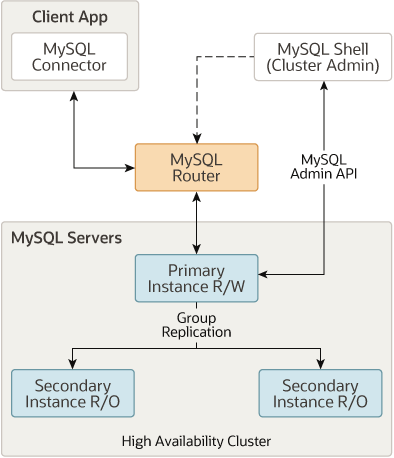
MySQL InnoDB Cluster provides high-availability and scaling features.

MySQL InnoDB Cluster consists of at least three MySQL Server instances.

MySQL InnoDB Cluster usually runs in a single-primary mode, with one primary instance (read-write) and multiple secondary instances (read-only).

  • Table creation and data insertion can be done only on the primary instance.
  • (Advanced users can also take advantage of a multi-primary mode, where all instances are primaries. This is not the common case).

MySQL InnoDB Cluster data nodes are actually a Group Replication.


InnoDB Cluster does not provide support for MySQL NDB Cluster.


MySQL NDB Cluster

A standard MySQL server does not support the MySQL Cluster engine NDB.

  • MySQL Cluster is tightly linked to the MySQL server, yet it’s a separate product.
  • This means we need to install the custom SQL server packaged.


MySQL Galera Cluster

  • Galera Cluster for MySQL is a true Multi-Master Cluster based on synchronous replication.
  • It is a multi-master database cluster that supports synchronous replication
  • https://galeracluster.com/